Repository navigation
format entire column #2802
Description

This is more of a question. I have scoured the internet trying to find out if there is a way to format an entire column as text. My "source" sheet has the entire column formatted as text but only the header row is text when I download/save it. The source file is just a "template" with only the header row having values. Rest are blank rows.
this is all I am doing in my code example (result is an arrayBuffer coming from the .NET webapi)
this.carrierRatesService.getCarrierRatesFileTemplate()
      .subscribe(result => {
        if (result.byteLength > 0) {
          const wb = xlsx.read(result, { type: 'buffer', cellStyles: true });
          const fileName = 'CarrierRatesTemplate.xlsx';
          xlsx.writeFile(wb, fileName)
        }})
This is the source file (7th row showing as Text datatype)
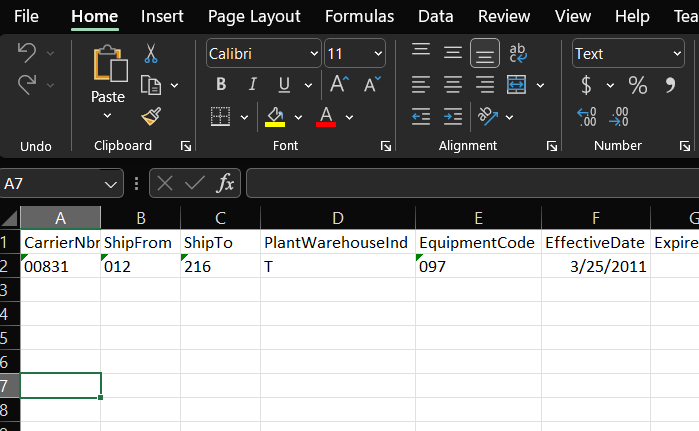
This is the result of my download (7th row as General datatype)

Is there a way to set an entire column manually? It is causing leading 0's to be cut off.
Activity
slymuffhugger commentedon Sep 29, 2022
A "hacky" way that I made it work but decided not to use was to add a space in the columns I wanted to retain the type for like 1000 rows.. So I'm guessing it just doesn't pass through formatting information on null value cells
Bamboleyla commentedon Nov 17, 2022
Hi! Tell me, did you create a file with the "text" cell format using an xlsx package or manually? The fact is that I manage to create files only with a "common" cell format, which leads to errors when working with the "=" symbol. And we need just a way to create an xlsx file with cells of the "text" format
OfirShechter commentedon Nov 14, 2024
any updates? having the same issue
Yin117 commentedon Jan 30, 2025
Was working on a simular situation and found that this helped.
In the read file options argument, add
{ cellStyles: true }Based on: https://www.npmjs.com/package/xlsx#parsing-options